
If you run a SaaS business, agency, or any company with a complex product, you know that maintaining an up-to-date, useful Knowledge Base (KB) is a huge drain on resources. We used to struggle with keeping our documents fresh, well-formatted, and easily accessible to users.
Recently, we completely overhauled our customer support and documentation workflow by integrating AI (Claude) directly into our Intercom setup. We want to share what we did, why we did it, and how you can replicate this workflow for your own customer education processes.
At Serpstat, we use AI not only in our SEO workflow but also in customer education. As the first AI-SEO partner, we aim to reduce manual labor throughout the search marketing, support, and documentation processes.
We decided to move our user manual from our admin panel to Intercom because it’s so easy with the Intercom AI bot to find data within its ecosystem. This allows it to provide better responses to our users directly in the chat on the site. Previously, managing the user manual within our management panel was a difficult challenge.
Here are the specific use cases and technical steps we used to automate the documentation.
1. Data Extraction: Why We Chose Markdown Over JSON
To get started, we needed to feed our existing documents to AI. Our developers have exported all the data in both Markdown and JSON formats.
How to apply: We found that AI models process Markdown much better than JSON. With JSON, AI has to spend processing power deciding what each element represents, whereas Markdown’s clear markup allows AI to quickly understand the structure of a document. If you’re exporting data to train AI on your company’s documents, always choose Markdown.
2. Creating Content for Both Humans and LLMs
We feed the AI our old manuals, FAQs, and various use cases, instructing it to compile this data into comprehensive, cohesive articles for each specific tool. We have designed the layout of these articles to perfectly fit the Serpstat product sidebar, ensuring a consistent and logical user experience.
How to apply: When producing articles, we created a very clear template that benefits users and AI agents:
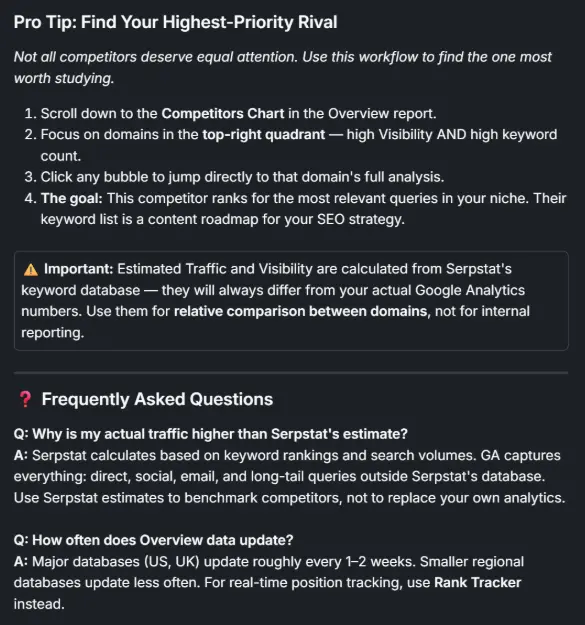
- LLM-Friendly “TL;DR”: Just after the title and a short description, we’ve added a short set of initial instructions. This is important not only for beginners, but because structured, clear lists are preferred by Major Language Models (LLMs).
- Plain text FAQ: We have identified the four most common questions for each tool like competitive analysis and are adding them to the articles. Importantly, we’ve stopped hiding FAQs inside drop-down menus; we made it plain text, as search engines prefer content that is fully visible.
- SEO communication: We’ve automated the inclusion of logical “next steps” at the bottom of each article, providing internal links that direct users to the next activity while optimizing SEO.
- Default image placeholders: We instructed the AI to automatically segment our image files and place the appropriate screenshots in the text.
3. More Publishing with Direct Intercom API Integration
We used the Intercom MCP server — a pre-built connector that connects Claude directly to the Intercom database without writing any custom scripts. Setup takes less than 5 minutes: one configuration file, no code. Once connected, a single command such as “Generate and publish all 11 articles for the Site Analysis section following the product template” was enough – Claude handled the writing, formatting, linking, and publishing automatically. We have updated the final output.
How to use this: Instead of writing scripts, we connected Claude directly to Intercom via an API and gave him permission to modify the Knowledge Base. By doing this, we publish in bulk automatically. We simply gave the AI a command like, “Process the entire Site Analytics category,” and it automatically generated and published all the pages included in that category in one request. All we had to do was review the final formatting.
4. Keeping Users in the Loop with the Help of App Content
One of the biggest conversion targets is forcing the user to leave the app to read the text.
How to use this: We’ve mapped our newly generated articles to appear directly in the Intercom chat widget within the Serpstat interface. When a user clicks on “Help”, the exact article they need opens right in the chat, allowing them to read and do work at the same time without breaking their workflow.
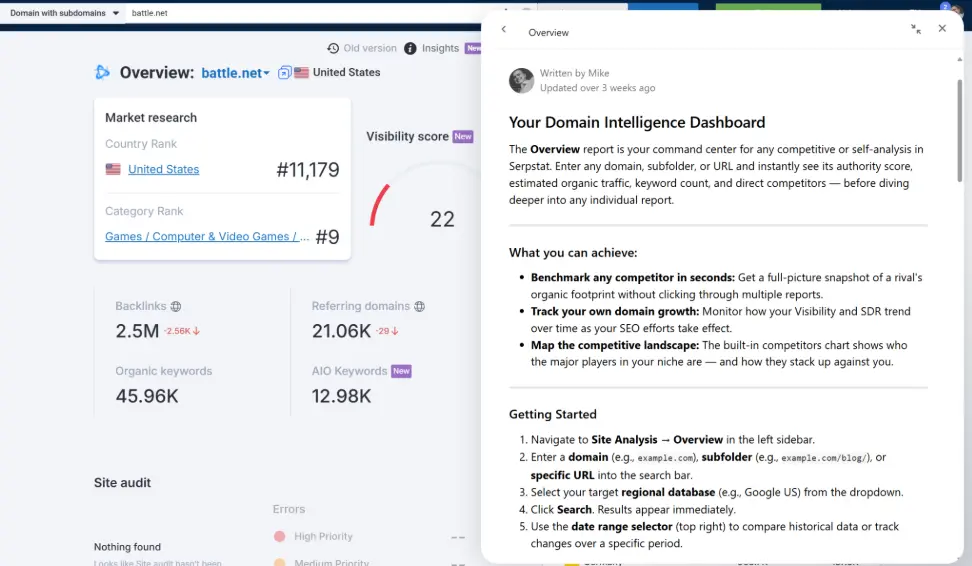
In addition, we’ve linked our help articles directly back to the actual tool’s reports – which act as internal landing pages – so users can jump into action.
5. Automatic Product Localization
Manually translating technical documents is tedious, but traditional AI translations often mess up the brand name.
How to use this: We’ve automated the translation of our basic English articles into other languages by simply instructing the AI to process Intercom’s existing data. To prevent the AI from producing incorrect word-for-word translations, we created a shared group “Skill” (a central reference document) containing our hard-type words. For example, the AI consults this document to know that it should never use literal translations in restricted phrases and knows exactly how to translate technical terms.
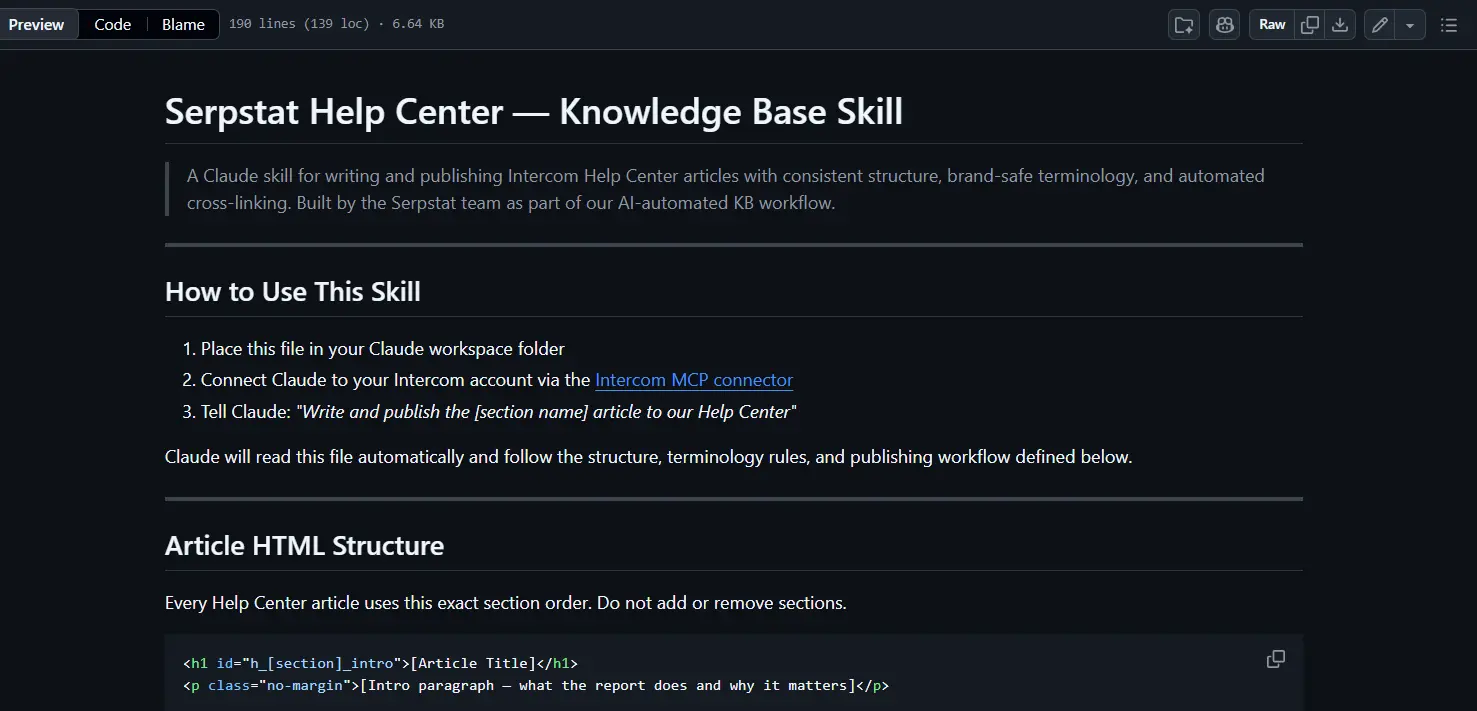
Our choice of the Claude Team system greatly improves this collaborative process by allowing us to share internal knowledge, specialized skills, and custom connectors across the organization. This central sharing ensures the consensus of the whole group; if a “Skill” works, it’s immediately available for everyone to use, and if it needs improvement, the whole team has visibility to identify and refine it.
However, we have a few Serpstat SEO reporting capabilities that you may be interested in. Here is the Serpstat Skills GitHub repository and video tutorial:
6. “Golden Reference” Self-correction Loop
Rapid engineering can take hours, so we’ve automated it with a more lightweight alternative to formal eval frameworks.
How to use this: We selected one of our existing articles that we considered to be the gold standard – excellent composition, tone, depth, and formatting – and embedded it directly into our Skill as a reference example.
The ability instructs Claude to compare every newly generated article against this reference in the same way:
- structural integrity
- consistency of tone
- level of detail
- formatting patterns
If a new article deviates from any of these dimensions, Claude automatically rewrites it until it matches the quality of the reference. This gives you the benefits of a self-correction loop – consistent quality, no manual review of all output – without the overhead of creating a numerical scoring rubric. The reference article sets the quality benchmark: it’s a much cheaper way to code “how good looks” than to write graphically based metrics.
7. Automatic KB updates from Task Trackers
Finally, a literature base is only useful if it is up-to-date. Keeping track of every new feature release and manually updating the KB is tedious.
How to use this: We have integrated our AI directly with our activity tracker. Now, when our developers close a job or release a new tool, AI automatically reads the job details, checks the appropriate Intercom article, and generates a list of proposed edits. A human manager simply reviews and approves the listing, and AI automatically pushes updates directly to Intercom’s live feed.
8. Integration of Content
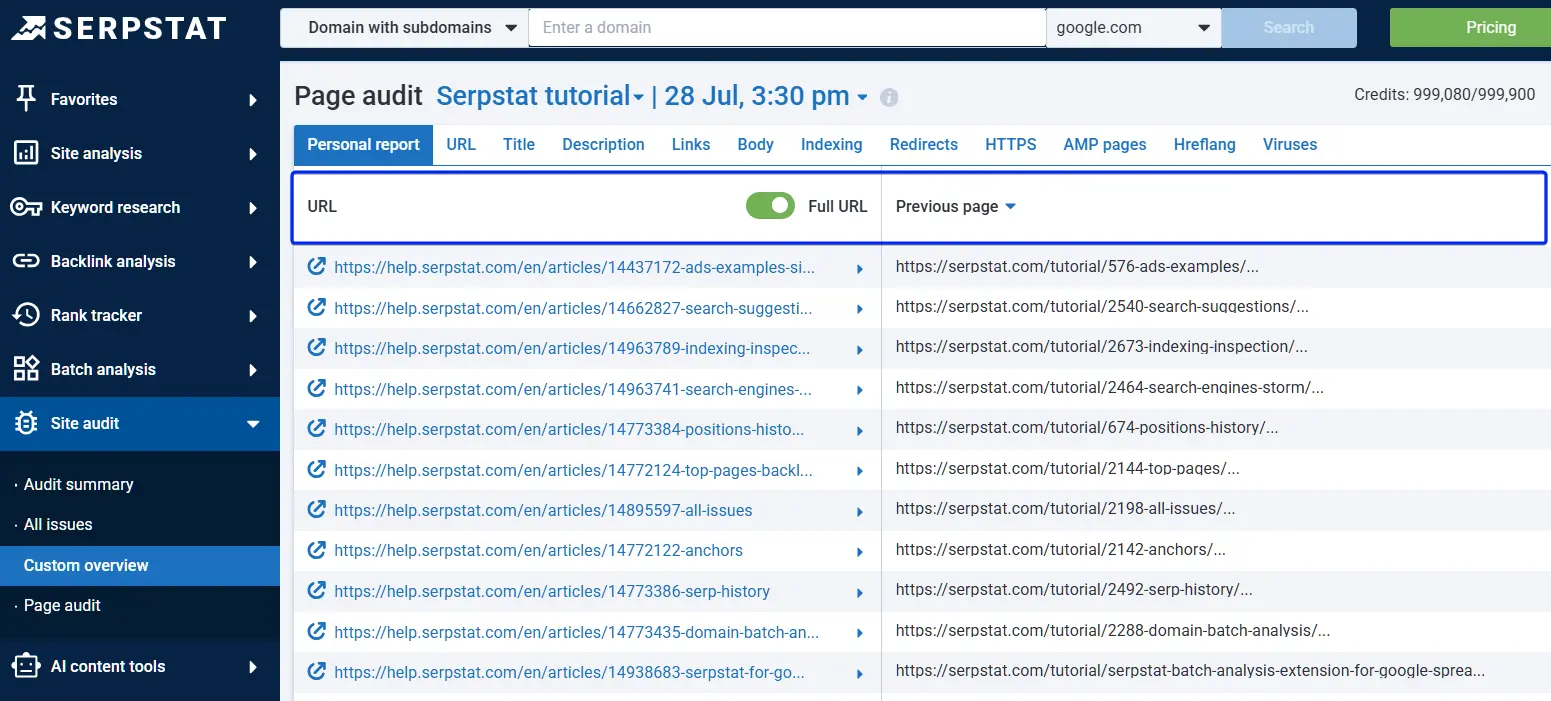
Intercom only supports custom subdomains (like help.serpstat.com), not subdirectories. Since we want KB traffic to benefit our main domain for SEO purposes, we plan to set up a reverse proxy so that the final URL is serpstat.com/tutorial/ — the content lives on Intercom, but from the search engines’ point of view it lives on our main domain. This is a DevOps project that we have already done with the team.
How to apply: We performed 301 redirects on each old page, combining fragmented content and bot signals into a simple set of high-authority, complete pages. After cleaning the server fee, we checked the redirects that have been done using Audit by Serpstat.
The conclusion
AI automation is no longer limited to customer support chatbots. With the right setup, it can be the foundation of an AI-powered knowledge base that’s always organized, localized, and up-to-date with minimal manual work.
By connecting AI to your knowledge base management system, defining clear product guidelines, and using a trusted article as a quality benchmark, you can turn scattered product information into consistent AI documentation. Add CMS or Intercom integration, task tracker monitoring, and automated review workflows – and your team gets a viable alternative to traditional automated document software.
The result isn’t just faster content production. It’s a support system where users get answers in context, managers spend less time on repetitive updates, and your documentation keeps up with product changes.